


 NEWS
NEWS
NEWS
NEWS
NEWS

It has been one year since Google launched its My Account site, a centralized hub where users can access their security and privacy settings, including features like Ads Settings and Privacy and Security Checkups.
One year on and Google are making some updates to My Account, a service that it says has been accessed by one billion people. The new updates include a new Find your phone feature for both Android and iOS users, as well as new quicker ways to access the My Account site.
Previously when your Android phone or tablet was lost or stolen you could use the standalone Android Device Manager app, similar to Apple’s Find My iPhone app. The Device Manager allows you to locate your Android device, reset its PIN and remotely erase it.
The update to My Account now makes it even easier to locate your missing device with a new feature called Find your phone.
Go to your My Account page and you will see the new feature, located under Sign-in & security. Tap the Find your phone option, select the device that you want to locate by tapping the arrow icon next to the name.
 On the next screen, you can select one of the various options to try and locate your lost device. You can either make your phone ring at maximum volume or lock it remotely and display a message and contact number so a good samaritan will hopefully contact you. Alternatively, tap the Locate icon to pinpoint its exact location using the Device Manager.
If you are an iOS user, Google cannot control Apple’s devices, so when you go to My Account you will be directed towards iCloud and Apple’s Find My iPhone app.
In addition to the new Find your phone feature, My Account has also been updated to include new ways to access the service.
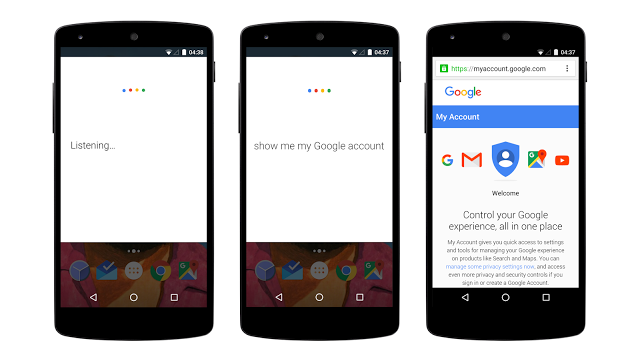
Open the latest version of the Google app and say “Ok Google, show me my Google account,” and you will be taken there. The new feature is available now, but at this stage, it is only available in English.
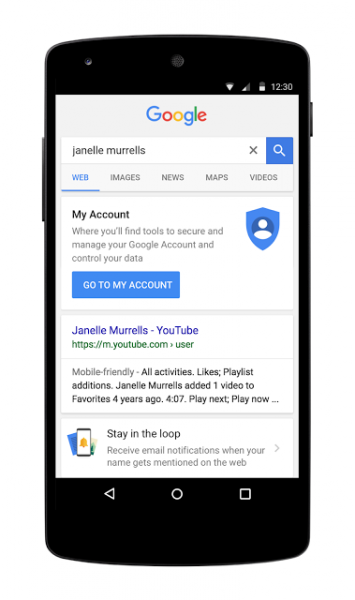 In addition to using your voice to find My Account, you will soon be able to simply search for your own name in the Google app and if you are signed in you will see a shortcut to My Account.
Support our mission to keep content open and free by engaging with theCUBE community. Join theCUBE’s Alumni Trust Network, where technology leaders connect, share intelligence and create opportunities.
Founded by tech visionaries John Furrier and Dave Vellante, SiliconANGLE Media has built a dynamic ecosystem of industry-leading digital media brands that reach 15+ million elite tech professionals. Our new proprietary theCUBE AI Video Cloud is breaking ground in audience interaction, leveraging theCUBEai.com neural network to help technology companies make data-driven decisions and stay at the forefront of industry conversations.