
 NEWS
NEWS
NEWS
NEWS
NEWS

In addition to a redesign of its Social Plugin buttons, Facebook is making it easier for its 1.65 billion monthly users to save and share their favorite content to the social media giant.
We look at the two new Facebook Chrome extensions – Save to Facebook and Share to Facebook – as well as the slight tweaks made to the design of the company’s Social Plugin buttons.
Since launching the Save on Facebook feature back in 2014, over 300 million people save articles, videos, etc to Facebook each month. Now the company is making it even easier to save items from the web to Facebook, which you can then access at a later stage, with the launch of its Chrome extension.
To get started saving articles, videos, recipes and more to Facebook, click the Add to Chrome button for the Save to Facebook Chrome extension > click Add Extension. When you come across content on the web that you want to save for later, simply click the Save to Facebook icon (flag icon), displayed next to the search bar and the content will be added to your Facebook Saved list.
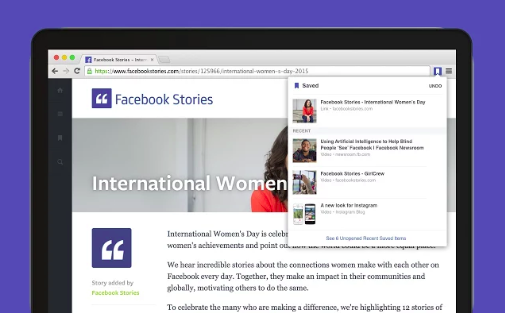
If you save something in error, simply click the Save to Facebook extension again > click the Undo button, next to Saved.
To access your saved articles from any device, simply log into Facebook and click on the Saved bookmark.
Regardless of a web page having a share to Facebook button, or not, the company has introduced a second Chrome extension – Share to Facebook – that will allow you to easily share content to your timeline, a friend’s timeline, in a Group, or directly on Messenger.
To ensure you can share content to Facebook at any stage, click the Add to Chrome button for the Share to Facebook Chrome extension > click Add Extension. When you come across any content on the web that you want to share to Facebook, simply click the Share to Facebook icon (Facebook ‘f’ icon). In the Facebook sharing dialog, select whether you want to add the link to your own timeline, a friend’s timeline, in a group, on a Page you manage, or directly with a friend on Messenger.
To share specific text from the article on Facebook, highlight the text > click the Share to Facebook Chrome extension button > the highlighted content will be included with the link to the article.
Facebook has also redesigned its Social Plugin buttons, replacing the Facebook ‘f’ icon on its Like button with the iconic thumbs up icon.

The company has also redesigned their other Social Plugin buttons with minor changes including color consistency, Like and Share counts within the button and a flat button design.

Facebook are also rolling out the ability to integrate Like, Comment and Share buttons to the bottom of Instant Articles in the coming weeks.
Support our mission to keep content open and free by engaging with theCUBE community. Join theCUBE’s Alumni Trust Network, where technology leaders connect, share intelligence and create opportunities.
Founded by tech visionaries John Furrier and Dave Vellante, SiliconANGLE Media has built a dynamic ecosystem of industry-leading digital media brands that reach 15+ million elite tech professionals. Our new proprietary theCUBE AI Video Cloud is breaking ground in audience interaction, leveraging theCUBEai.com neural network to help technology companies make data-driven decisions and stay at the forefront of industry conversations.