 NEWS
NEWS
NEWS
NEWS
NEWS

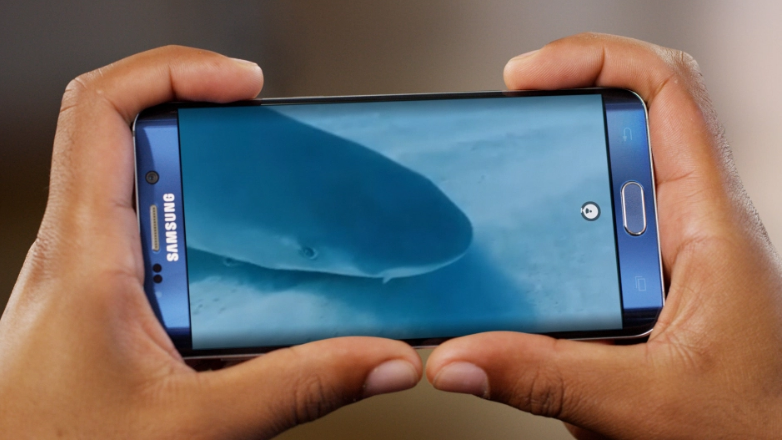
Since the launch of 360 videos, more than 250,000 videos have been uploaded to Facebook. To assist publishers in increasing audience engagement with their videos, Facebook has now launched two new publisher tools for 360 videos. The new tools will allow publishers to take viewers on a guided tour of their videos, as well as get a clear indication of which sections were most enjoyed by the audience.
In addition, the company is also launching a range of video metrics that will allow publishers to better understand their video-watching audience as well as the impact of their videos.
Facebook has launched two new publisher tools, Guide and Heatmap, which will assist 360 video creators with audience engagement and the ability to view which parts of the video the audience were most engaged with.
As the name suggests, Guide will allow publishers to provide viewers of their 360 video with a guided tour and highlight the best parts of the video.
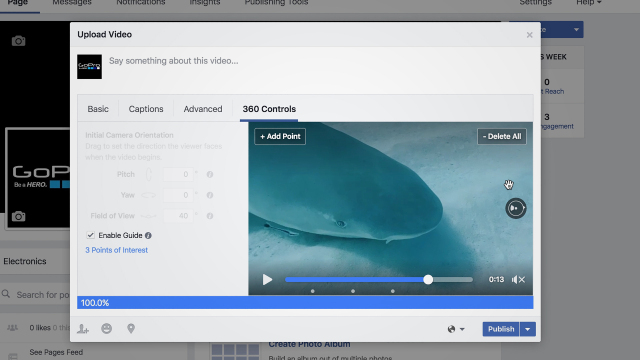
To use the new Guide tool when uploading a new 360 video, go to the 360 Controls tab > check the box for Enable Guide. Play the video and identify the points of interest to highlight. To add a point of interest, pause the video > click + Add Point. Once all the points of interest have been added, click the Publish button.
Now when a Facebook follower watches the 360 video they will automatically be taken on the predefined path that the publisher has chosen.
Note: Guide is turned on by default, but viewers can opt out of it and watch the 360 video at their own leisure, by simply panning or swiping out of the scene. To return to Guide mode they can tap the heading indicator on the right of the video to say Auto.
The likes of GoPro, New York Times and ABC News are already making use of Guide in its 360 videos.
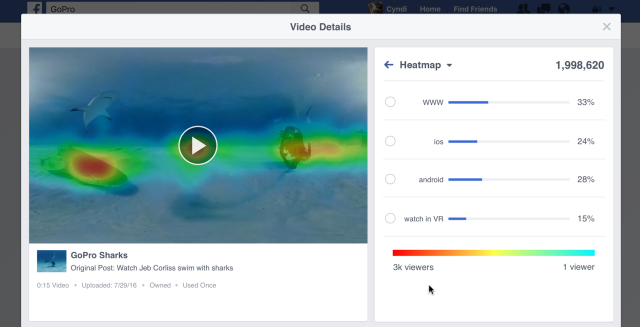
The new Heatmap tool for 360 videos will provide publishers with insights of which sections of the video was enjoyed most by the audience, indicating the ‘hottest’ sections of the video.
Note: The Heatmap tool is available for all 360 videos posted since May 1, but the video will need to have over 50,000 unique viewers.
To view a Heatmap for a specific video, go to Publishing Tools > Video Library > select the relevant video > select the Video Insights tab. The Heatmap for the specific video will be displayed, showing which sections of the video were enjoyed the most.
These features have started rolling out and will be available to all Pages in the next couple of weeks.
With the availability of the new demographic data, publishers will be able to get a clear indication of the type of people who are most engaged with their video. Demographic data is available for all videos, including 360 and Live.

To access video demographics go to Video Insights > Audience and Engagement. The demographic data is available for every minute of the video, split between age, gender and top geographic locations.
Publishers of Live videos will be able see at which sections of the video audience members were compelled to comment on, react to, or share the video. After a Live broadcast, publishers will be able to analyze the video and get a clear indication of the most compelling video moments for the audience.
Go to Audience and Engagement > Video Engagement > select a section of the graph where there was a peak in engagement and watch the corresponding section of the video.
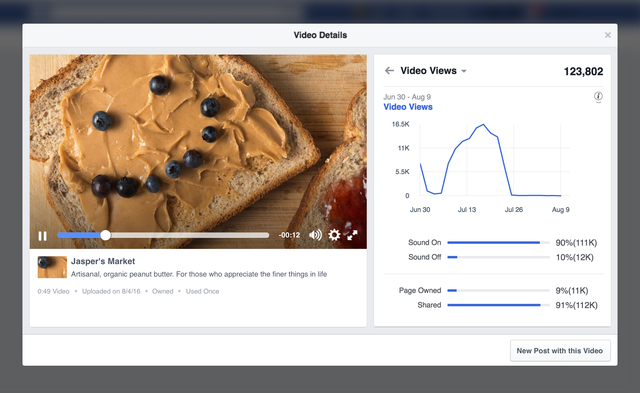
Another tool available for all videos allows publishers to see the impact that sharing and crossposts had on the overall viewer count of their video. Displayed under the existing ‘Minutes Viewed’ and ‘Views’ cards, publishers will get a breakdown of views and minutes viewed for both the original post compared to when the video was shared or crossposted.
Support our mission to keep content open and free by engaging with theCUBE community. Join theCUBE’s Alumni Trust Network, where technology leaders connect, share intelligence and create opportunities.
Founded by tech visionaries John Furrier and Dave Vellante, SiliconANGLE Media has built a dynamic ecosystem of industry-leading digital media brands that reach 15+ million elite tech professionals. Our new proprietary theCUBE AI Video Cloud is breaking ground in audience interaction, leveraging theCUBEai.com neural network to help technology companies make data-driven decisions and stay at the forefront of industry conversations.