















 APPS
APPS
APPS
APPS
APPS

Microsoft Corp. announced various updates Friday for Office 365, including new classroom experiences for Microsoft Teams. The company will showcase how it is helping students at this week’s International Society for Technology in Education Conference, taking place in San Antonio, Texas.
Other Office 365 updates include security enhancements, a public preview of Microsoft Forms and more.
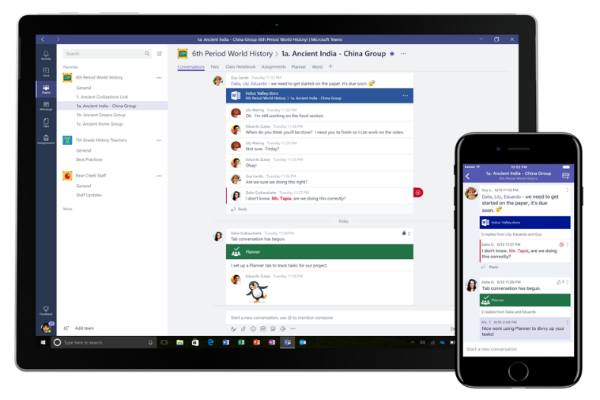
Microsoft’s main update is the new classroom experiences for its chat tool, Microsoft Teams. The company launched Microsoft Teams in March for enterprise users and subsequently made it available for education users so that teachers and students could also make use of the chat-based collaboration tool.
New updates for the Microsoft Teams classroom experience include:
School Data Sync allows teachers to automatically populate student rosters and projects, based on the school’s information system when a new class starts. A teacher can automatically load new settings and projects on their device and on the students’ devices.
Linked OneNote Class Notebooks come with each class, which allows the entire class to store text, images, handwritten notes, attachments, links, voice, video and more. The Class Notebook in Teams is located under the General channel. The OneNote Class Notebook is made up of Student Notebooks, a private area accessible by the teacher and the individual student; the Content Library is a read-only space where teachers can share handouts; and the Collaboration Space, where all students can share, organize and collaborate.
Each time a new channel is created in the class team, a new section will automatically be added to the Class Notebook’s Collaboration Space.
Apps, like Word, Excel, PowerPoint and Planner, have been integrated into the classroom experience.
With end-to-end assignment management, teachers are able to create assignments, add due dates, distribute work to student groups and grade the work accordingly. While students are able to complete and submit assignments.
Microsoft Teams also allow teachers to collaborate with each other on school-wide initiatives and best practices using Staff Notebooks.
These features have begun rolling out to Office 365 for Education customers worldwide.
Microsoft has also rolled out additional security features, including the expansion of Windows Information Protection to Windows desktops. Previously available for Office mobile apps, WIP allows users to designate content as “work” or “personal,” helping to prevent accidental data leaks while employees still get to maintain control over their personal data.
Office 365 Advanced Threat Protection has also been updated to include new reporting for when malicious emails are detected and blocked in an organization. The new ATP Safe Link policies allow specific URLs to be blocked, customization of policies for specific users and more.
Updates for Office 365 Advanced eDiscovery include an improved user interface for managing the entire case lifecycle; and optical character extraction, whereby text is extracted from images or objects within files and helps organizations comply with internal policies and regulatory bodies.
Microsoft is rolling out a public preview of Forms to Office 365 commercial customers. Microsoft Forms, which was previously only available for education customers, allows users to create surveys, quizzes and polls.
All customer or employee feedback is available in real time via the Responses tab, together with auto-generated charts. Users can also download an Excel spreadsheet for more in-depth analysis.
In addition, users can create custom forms with PowerApps and SharePoint lists.
Last week Microsoft announced the general availability of its business video service, Microsoft Stream. The service, which will eventually replace Office 365 Video, allows users to securely upload, share, manage and view videos on a single platform.
Researcher, a tool that allows users to find and incorporate reliable citations into their documents, is being expanded beyond Word on Windows desktops to Word on Macs, as well as to OneNote for Windows 10. Researcher uses the Bing Knowledge Graph and allows users to search for and incorporate citations without leaving the Word or OneNote app.
Users are now able to share their MyAnalytics insights with colleagues and managers. The MyAnalytics insights cover how much time an individual spends in meetings, on emails, how many hours are focused and how much is spent on after-hours work. Users can share a portion of the insights, a summary or the full overview.
Support our mission to keep content open and free by engaging with theCUBE community. Join theCUBE’s Alumni Trust Network, where technology leaders connect, share intelligence and create opportunities.
Founded by tech visionaries John Furrier and Dave Vellante, SiliconANGLE Media has built a dynamic ecosystem of industry-leading digital media brands that reach 15+ million elite tech professionals. Our new proprietary theCUBE AI Video Cloud is breaking ground in audience interaction, leveraging theCUBEai.com neural network to help technology companies make data-driven decisions and stay at the forefront of industry conversations.