


 APPS
APPS
APPS
APPS
APPS

Movies Anywhere, a digital movie locker owned by The Walt Disney Co., has launched with the backing of major Hollywood studios.
It’s not a completely new service, originally launched Disney Movies Anywhere in 2014, but the service has been expanded significantly to offer a broader selection. Industry heavyweights, including Warner Bros. Entertainment Inc., Universal Pictures Ltd., Sony Pictures Entertainment Inc. and Twentieth Century Fox Film Corp. are now backing the service. Together with Disney movies, the service has a library of more than 7,300 titles.
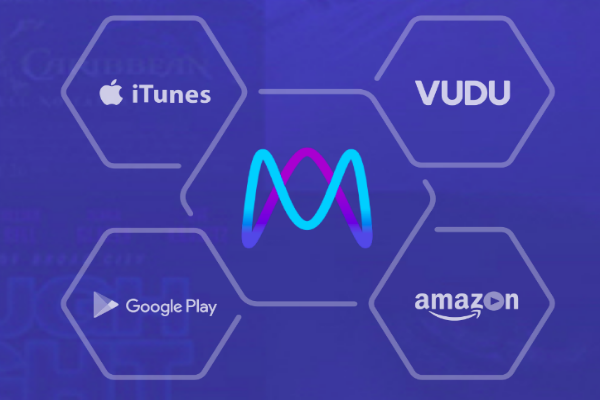
Movies Anywhere is a free app that provides users with a single place for their entire digital film library. In a single place, users can connect the Movies Anywhere app to their iTunes, Amazon Video, Google Play or Vudu accounts and access all the eligible movies they’ve purchased through those retailers from various devices and operating systems.
The digital movie locker is a free app, but as the saying goes, “Nothing in life is free” and Disney will be making a profit in some way. This is possible by collecting and monetizing users’ data. According to the “Movies Anywhere” privacy policy, in addition to collecting viewing and activity habits, the company will also collect information from social media or third-party services used to log into the platform. Information that can be collected from these services includes email address, telephone number, birthdate, user ID, username and password.
The privacy policy also details a large number of entities that could get access to this information: “We may share information collected from or about you with carefully selected companies, including advertisers, content licensors, distributors, and other companies that are not affiliated with us, including to provide you with marketing, promotional, updates, and other offers.” Depending on the privacy policies of the companies buying the data, it can be shared further.
Although this information is shared by default, it is possible to opt out of video-data sharing. Here’s a look at how to get started with Movies Anywhere and modify data-sharing settings:
The Movies Anywhere app is available for iOS, Apple TV, Android, Android TV, Amazon Fire devices and Roku. The service also supports Chromecast and movies can also be watched on your personal computer or Mac.
When you sign up for a Movies Anywhere account and connect at least two retailers (iTunes, Amazon Video, Google Play or Vudu), you will get five free movies, “Big Hero 6,” “Ghostbusters (2016),” “Ice Age,” “Jason Bourne” and “The Lego Movie,” to add to your library.
Head to the Movies Anywhere site and signup for an account. You have the option to connect an existing Facebook or Google account. Alternatively, you can provide an email address and create a new password.
Connect one or more retailers (iTunes, Amazon Video, Google Play or Vudu). If you connect one retailer, you will get “Ghostbusters (2016)” and “Ice Age” for free. Connect two or more retailers and you will all five movies, mentioned above, for free.
Note: If using a desktop browser to set up your connection to iTunes, you’ll need to have the desktop client installed.
Your movies can take up to an hour to appear in your “My Movies” library.
Movies Anywhere apps are available for Amazon Fire, Android (KitKat or newer), Apple TV (4th generation or later), iOS (iOS 9 or higher), Roku and all major web browsers (Chrome 50+, Edge 15+, Firefox 40+, Safari 10.0+ and Internet Explorer 11+).
In addition, all movies you have purchased in, for example, iTunes, will cross-pollinate to your other libraries — for example, Vudu. Movies can be played directly on any platforms that support video playback for these providers.
Note: Movies Anywhere currently does not support 3D, 4K or HDR formats, but it does support “Picture in Picture” playback on the iPad Pro, iPad Air or later and iPad mini 2 or later running iOS 9 and above.
Movies can be downloaded for offline viewing, while parents can set up additional profiles together with movie rating restrictions to prevent kids from watching restricted movies.
Movies Anywhere will also let users buy movies directly using their retailer of choice to complete the process.
By default, Movies Anywhere will share various information with the retailers you have connected to the platform. The digital movie locker does give you the option to opt out of video-data sharing with participating studios and “Movies Anywhere” service providers.
To do this tap or click the Menu icon > select “Video Data Sharing” > update your preferences.
Source: Movies Anywhere Help
Support our mission to keep content open and free by engaging with theCUBE community. Join theCUBE’s Alumni Trust Network, where technology leaders connect, share intelligence and create opportunities.
Founded by tech visionaries John Furrier and Dave Vellante, SiliconANGLE Media has built a dynamic ecosystem of industry-leading digital media brands that reach 15+ million elite tech professionals. Our new proprietary theCUBE AI Video Cloud is breaking ground in audience interaction, leveraging theCUBEai.com neural network to help technology companies make data-driven decisions and stay at the forefront of industry conversations.