

Instagram has officially launched its Business Profiles, features it first announced a couple of months back. By converting to an Instagram Business Profile, companies will be able to get insights into their followers and the posts they like the most, as well as promote specific posts directly in Instagram.
The features are rolling out first in Europe, followed by Australia, New Zealand, and the U.S. The new Business Profile tools will be available globally by the end of 2016.
We look at how you can convert your personal Instagram account into a Business Profile. We also look at the various features you will have access to with a Business Profile, including various insights on your followers and how to promote your best-performing posts directly in the app.
The free Business Profiles feature, allows any Instagram account to be recognized as a business. Followers can then contact you via phone or email by tapping the contact button. Business Profiles can also add directions so followers can find your restaurant, retail store, etc.
Tip: Setting up an Instagram Business Profile provides you access to the new insights feature and the ability to promote your best posts.
Note: At this stage, you can only connect a single Facebook Page to your Instagram Business Profile.
Note: If you want to link to a different Facebook Page at a later stage you will need to change back to a personal account and then follow the process again of setting up your Business Profile and linking the new Facebook Page.
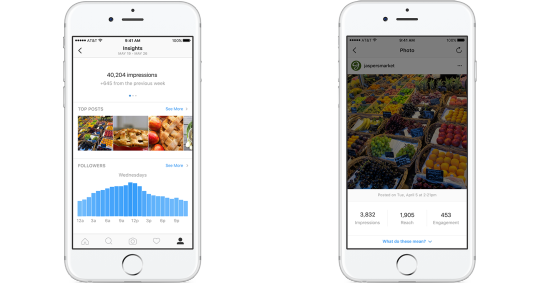
Now that you have an Instagram Business Profile set up, you will be able to use the insights feature to learn about your followers and the types of posts they like the best.
You will be able to see the following insights:
Insights will also be able to show you demographics about your followers including age, gender, and their location.
To access the insights feature, log into your Business profile > tap the bar chart icon in the top right. The insights page is divided into three sections.
Section 1: The insights screen will show the total amount of impressions your posts have received over the last seven days. Swipe left on the impressions heading and you will see the total amount of reach.
Section 2: The second section on the insights screen shows insights from your Top posts. Tap See More to see the top posts on your Business Profile over the last seven days, sorted by total impressions. You can filter your posts by type, metrics, and date.
To get more detail on a single post, select the post > tap View insights. Total number of impressions, reach and engagement will be shown for your selected post.
Section 3: The third section shows follower activity. Tap See More > you will see the total number of followers and a breakdown of their age, gender, location and the day and time they usually log into Instagram.
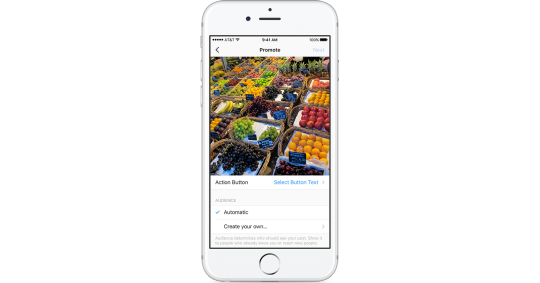
With a Business Profile setup, you can also promote your best-performing posts directly in Instagram.
Your promoted post will be reviewed by Instagram to ensure it meets its ad policies. This normally takes 60 minutes, after which your promotion will start running if approved.
Source: Facebook Advertising Help Center
Support our mission to keep content open and free by engaging with theCUBE community. Join theCUBE’s Alumni Trust Network, where technology leaders connect, share intelligence and create opportunities.
Founded by tech visionaries John Furrier and Dave Vellante, SiliconANGLE Media has built a dynamic ecosystem of industry-leading digital media brands that reach 15+ million elite tech professionals. Our new proprietary theCUBE AI Video Cloud is breaking ground in audience interaction, leveraging theCUBEai.com neural network to help technology companies make data-driven decisions and stay at the forefront of industry conversations.