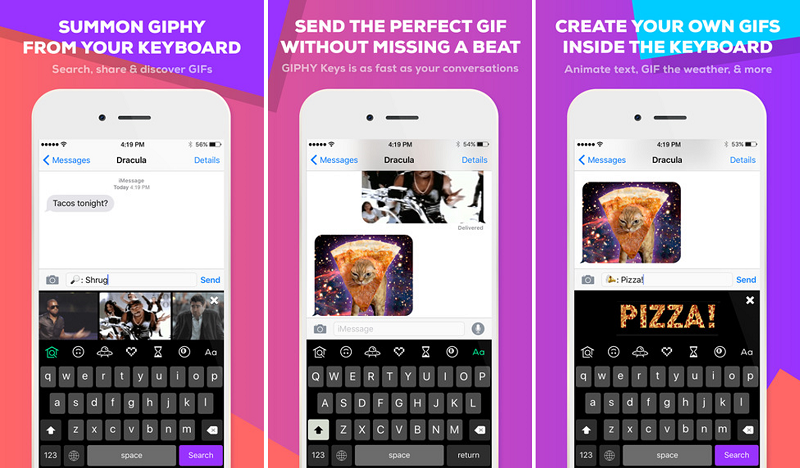












When words just won’t do, GIPHY Inc. has always been the go-to place when you need the perfect GIF to send to a friend. The animated GIF search engine, who raised $55 million Series C in February, has now made it even easier to get your hands on GIFs with the introduction of GIPHY Keys, a GIF keyboard for iOS users.
We look at how you can now find the best GIFs and create your own directly from your keyboard in any app.
Download GIPHY Keys for iOS from the App Store. The app requires iOS 8.0 or later.
Once it has been installed on your device you will need to install it as a keyboard on your iPhone. Go to the Settings app > General > Keyboards > Add New Keyboard > tap on GIPHY Keys.
No matter what app you are in, simply tap the little globe icon in the bottom left of your keyboard, which will bring up the GIPHY Keys interface and you can start searching for the perfect GIF.
When you first open the GIPHY Keys interface you will see a real-time feed of trending GIFs. Scroll through the GIFs and find the most relevant one for your response.

Looking for a specific gift, simply start typing, scroll through the suggested GIFs and find the one you love.
GIPHY Keys has a curated list of GIFs under various categories that will allow you to find the most appropriate GIF. Tap the upside-down smiley face icon, search through the categories (thumbs down, applause, popcorn, etc.) and choose your GIF.

If you come across GIFs you love or ones you use regularly you can add them to your favorites for easy access. Simply tap the heart icon > Save to Favorites. Or simply double tap the GIF you love and it will automatically be added to your favorites.
Tap the magic 8 ball icon > tap #echo > type in your message and your words will be transformed into a GIF.
Under the magic 8 ball icon, you will also find #sticker, which will allow you to discover random animated stickers, and #text will allow you to find the perfect text GIF of the word you just typed in. Others include #8ball that will give you the answers to your life questions, while if you tap #weather, input your zip code it will find the weather for you.

When you have found the best GIF using one of the methods above, simply tap the GIF and it will copy automatically. Tap in your chat to paste the GIF > tap Send.
If you tap and hold the GIF you will be given more options, like posting the GIF link to Twitter or Facebook.
Support our mission to keep content open and free by engaging with theCUBE community. Join theCUBE’s Alumni Trust Network, where technology leaders connect, share intelligence and create opportunities.
Founded by tech visionaries John Furrier and Dave Vellante, SiliconANGLE Media has built a dynamic ecosystem of industry-leading digital media brands that reach 15+ million elite tech professionals. Our new proprietary theCUBE AI Video Cloud is breaking ground in audience interaction, leveraging theCUBEai.com neural network to help technology companies make data-driven decisions and stay at the forefront of industry conversations.