

As live streaming video becomes increasingly popular with the likes of Facebook Live and the rumored YouTube Connect, competition is hotting up. Twitter-owned Periscope has announced a variety of new features to ensure it remains competitive.
In the coming weeks, Periscope broadcasts will automatically be saved beyond the current 24 hours, and users will be able to search for broadcasts based on topics or titles. Periscope has also announced integration with DJI drones, allowing users to broadcast from the sky.
We look at the new save and search functionality as well as the steps involved in broadcasting from your DJI drone and how you can ensure a great broadcast.

Periscope introduced its public beta last week that provides users with the ability to save their broadcasts beyond 24 hours, by simply inserting #save into their titles.
In the coming weeks, all Periscope broadcasts will be saved automatically to both Periscope and Twitter together with any comments and hearts. You are in control, though, so if there are any broadcasts you no longer want you can simply delete them in your profile or in the post-broadcast screen. You can also opt to stick with the current 24-hour timeframe by updating your account settings.
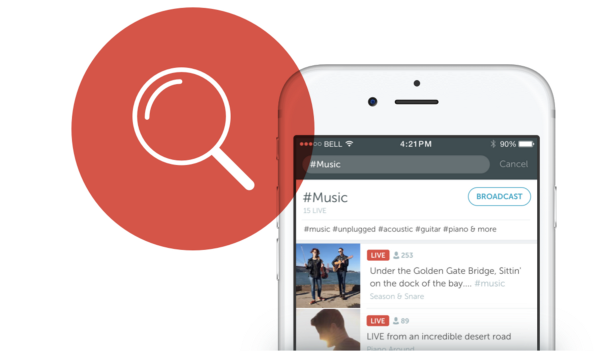
For the first time, Periscope is adding search functionality allowing you to search for broadcasts by topic or title. Tap on the search button in the Global List and you will see suggested tags, including #Food, #Travel, #Music, etc. Click on a tag to view live videos and replay old videos.
If you want to broadcast about one of these topics, simply tap the Broadcast button in the specific topic’s search results. Alternatively, just add the specific hashtag to your title the next time you broadcast.
In the coming weeks, Periscope will also be testing two topics, including First Scope for users broadcasting for the first time and who can then be welcomed to the community. As well as GoPros and Drones, which will obviously focus on broadcasts from GoPros and drones.
Periscope also announced that it will also be adding support for DJI drones, allowing iPhone users to broadcast their drone’s video to Periscope.
To be able to broadcast from your drone you will need a DJI Inspire, Phantom 4, Phantom 3 Professional or Advanced, or an Osmo. You will also need an iPhone 5s, 6, 6 Plus, 6s, or 6s Plus with iOS 8.2 or later.
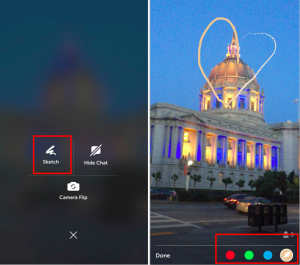 Use the Sketch feature to highlight objects during your drone’s broadcast. During your broadcast, press down on your iPhone’s screen for a couple of seconds. The advanced control panel will appear > tap the Sketch icon > select a color – blue, green or red – displayed at the bottom of the screen or use the eyedropper tool to select a color from the image on your screen. To change the width of your lines, press harder or softer on the screen. Your sketch will only remain on the screen for a few seconds before they fade completely.
Sources: Periscope; Drones | Periscope; Switch
Support our mission to keep content open and free by engaging with theCUBE community. Join theCUBE’s Alumni Trust Network, where technology leaders connect, share intelligence and create opportunities.
Founded by tech visionaries John Furrier and Dave Vellante, SiliconANGLE Media has built a dynamic ecosystem of industry-leading digital media brands that reach 15+ million elite tech professionals. Our new proprietary theCUBE AI Video Cloud is breaking ground in audience interaction, leveraging theCUBEai.com neural network to help technology companies make data-driven decisions and stay at the forefront of industry conversations.