


Following a name change two weeks ago, from Google for Work to G Suite, Google Inc. has announced various new smarter, time-saving features for its productivity suite.
Here’s a look at the new features, including the ability for Google to intelligently assign action items, voice commands, smarter Forms and more.
In Docs you can now easily assign action items to team members. When you start typing an action item, Google will use Natural Language Processing to intelligently assign an action item to a specific person.
If Google detects an action item when you are typing in Docs, for example, “Jen to send a follow-up email,” it will provide a suggested action item.
Click Assign in the suggestion pop-up to accept the suggestion or Dismiss to ignore it. If you want to edit the suggestion, click the More icon (three dots) > Edit.
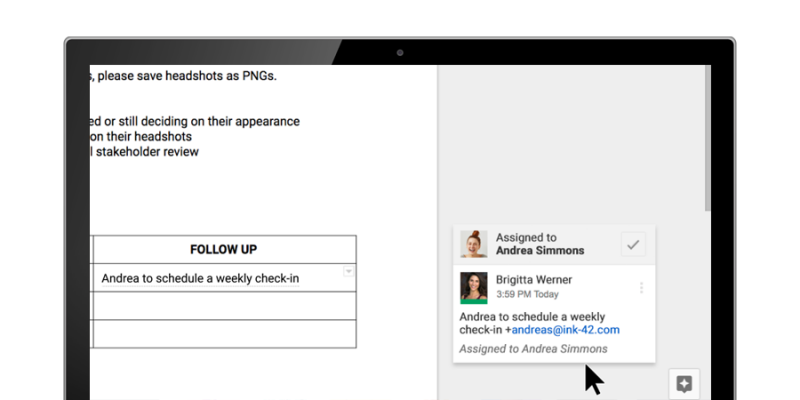
For Google to be able to intelligently suggest action items, the text must mention either the person’s name or email or mention someone who has access to the file.
Note: You can turn off the action item suggestions completely by clicking on Tools > Preferences > uncheck “Suggest action items.”
Action items can also be assigned manually in the Docs, Sheets and Slides desktop and mobile apps.
Open a Google file > highlight the information you want to comment on > click the Comment icon in the toolbar > type your comment. Type a person’s name or type the email address of the person you want to assign the task to, together with @ or “+” in front of it.
Tick the box next to “Assign to [name]” > click Assign.
When team members visit Docs, Sheets, Slides (or Drive) from either the mobile apps or desktop they will see a number on the file depicting action items assigned to them or unresolved suggestions.
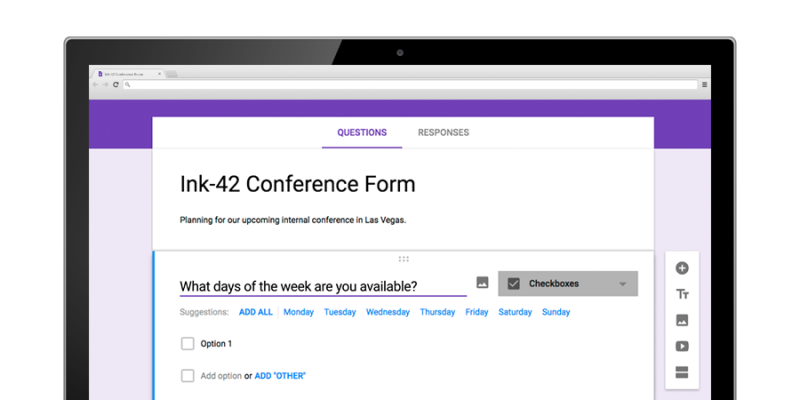
Google Forms has also received an update and will now use neural networks to suggest possible responses to the question you are typing, as well as intelligently know the question type.
Open a form in Google Forms > click the Add button (“+” icon). Type your question and select the responses from the generated suggestions. You can add them one at a time or all together.
Google Forms also includes a new “File upload” question type. Files can be uploaded from a team member’s computer or Drive and any uploaded files will be displayed in a new Drive folder. The feature is only available for G Suite customers in Forms shared within their organization.
Google introduced Voice typing in September last year as a way for users to easily capture their ideas in Docs without the need to type a single letter. As part of its updates for G Suite, Google is adding new voice commands, including changing text color, deleting words, inserting links, comments, and more.
Note: To use voice typing and voice commands you will need to turn your computer’s microphone On and ensure it is working properly.
Google’s support page for voice commands has a complete list of what changes you will be able to make to your document using your voice. Voice commands are only available in English, both the account language and document language must be English.
Thanks to Google Drive integration it is now possible to create and share Google Docs and Drive files directly within the business-focused messaging platform, Slack.

Create new Google Docs, Sheets, and Slides: In the Slack message box, click the “+” button > select the relevant file from the Google Docs file options. The new file can be shared in your Slack channel and saved to Google Drive.
Share files from Google Drive: In the Slack message box, click the “+” button > click Google Drive under “Import a file from…” The original sharing preferences will remain for the shared file on Slack.
You can add the Google Drive integration to your Slack team from the company’s App Directory.
Source: Google support
Support our mission to keep content open and free by engaging with theCUBE community. Join theCUBE’s Alumni Trust Network, where technology leaders connect, share intelligence and create opportunities.
Founded by tech visionaries John Furrier and Dave Vellante, SiliconANGLE Media has built a dynamic ecosystem of industry-leading digital media brands that reach 15+ million elite tech professionals. Our new proprietary theCUBE AI Video Cloud is breaking ground in audience interaction, leveraging theCUBEai.com neural network to help technology companies make data-driven decisions and stay at the forefront of industry conversations.