 APPS
APPS
APPS
APPS


APPS

On Friday, Dec. 2, the day before the 2016 International Day of Persons with Disabilities, Microsoft Corp. announced various new accessibility features for Office 365 to ensure content is easier to use for people with varying levels of vision, hearing, cognition and mobility.
Here’s a look at the new accessibility features coming soon for Office 365 users:
These changes are rolling out in early 2017, if you want to get early access to the accessibility features you will need to sign up for the Office Insider or First Release options with Office 365.
Microsoft has added accessible templates to its online template options in Word, Excel and PowerPoint for both PC and Mac.
Select “New” in Excel, Word or PowerPoint > in the search box, type “accessible” > click the search icon > in the category list on the right, select the type of template category you are looking for (for example, business plans, presentations, brochures, etc.) > select the template that you want to use.
These new accessible templates use fonts and colors that make it easier for people with low vision or color blindness to read. The templates are also designed to make navigation easier using a screen reader and keyboard.
More accessible templates will be added in the “coming months” for both Office users on PC and Mac, as well as for Office Online and Office Mobile applications.
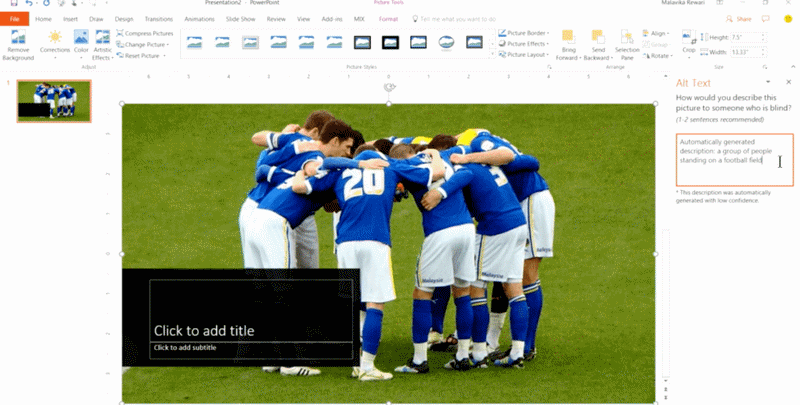
Rolling out first to Word and PowerPoint, Microsoft’s applications will automatically be able to come up with image descriptions. When a person with a visual impairment is reviewing a slide deck it is important that an image description, or alternative text descriptions (alt-text), has been added so that the person can fully grasp what is happening. This will then allow the person’s screen reader to read the image’s caption.
To achieve this, Microsoft uses its Computer Vision Cognitive Service, which uses machine learning to recognize objects in photos and provide the best description. “Through machine learning, this service will keep improving as more people use it, saving you significant time to make media-rich presentations accessible,” said John Jendrezak, accessibility lead and partner director of program management for the Office engineering team at Microsoft, wrote in a blog post.
To use the new feature in Word and PowerPoint, right-click on the photo in your document or presentation > select “Automatic Alt Text.”
To ensure Word and PowerPoint users aren’t confused when it comes to entering alt-text, Microsoft has also merged the separate fields for title and description. To add alt-text to an image, open the Format pane > select the “Size & Properties” tab (in PowerPoint) or the “Layout & Properties” tab (in Word) > select the “Alt Text” dropdown.
To ensure screen reader users understand the purpose of links to webpages and documents it’s important to add display names. To make this task easier, Microsoft is introducing “Link Gallery” in Word, Excel, PowerPoint and Outlook for PCs, as well as in several Office Mobile applications.
The Link Gallery will show the most recently used files from SharePoint and OneDrive, as well as any webpage from your clipboard. When one of these links is selected, the tool will automatically add the file or webpage’s name as the display text, which you can then edit if needed.
To access the Link Gallery, highlight the text that you want to hyperlink > click on the Insert tab > Links > Link > you will see a list of Recent items.
Microsoft is also adding an accessibility checker so you can ensure you fix any accessibility errors before you share your document. The feature will be available for Word, Excel, PowerPoint and OneNote for PC applications, it is also available in Visio for PCs and several Office for Mac and Office Online applications.
To access the accessibility checker, select the Review tab > select the “Check Accessibility” button. In addition to finding any accessibility errors in your document, it will also provide links to support articles on creating accessible documents, spreadsheets, presentations and emails.
Microsoft has also announced accessibility updates for the fourth quarter of its 2016 accessibility roadmap. Some of the new features include:
You can view the full list of accessibility features for quarter four, on the Office 365 blog.
Source: Microsoft
Support our mission to keep content open and free by engaging with theCUBE community. Join theCUBE’s Alumni Trust Network, where technology leaders connect, share intelligence and create opportunities.
Founded by tech visionaries John Furrier and Dave Vellante, SiliconANGLE Media has built a dynamic ecosystem of industry-leading digital media brands that reach 15+ million elite tech professionals. Our new proprietary theCUBE AI Video Cloud is breaking ground in audience interaction, leveraging theCUBEai.com neural network to help technology companies make data-driven decisions and stay at the forefront of industry conversations.