 CLOUD
CLOUD
CLOUD
CLOUD


CLOUD

Editing business documents, spreadsheets and presentations in G Suite is set to become a lot more straightforward.
This morning, Google Inc. rolled out new features for the productivity suite that aim to tackle several of the pain points often experienced by teams during collaborative projects. The first is version control. Retrieving a past iteration of a file had required identifying the point in time when it was created, which can be a major hassle if multiple users contribute to the document.
Today’s update addresses the issue by introducing the ability to name document versions that might be needed in the future. A company’s legal team, for example, could save copies of a contract under distinct titles before every major modification. Personnel can then quickly find and restore the relevant version if a change is rejected by the chief counsel.
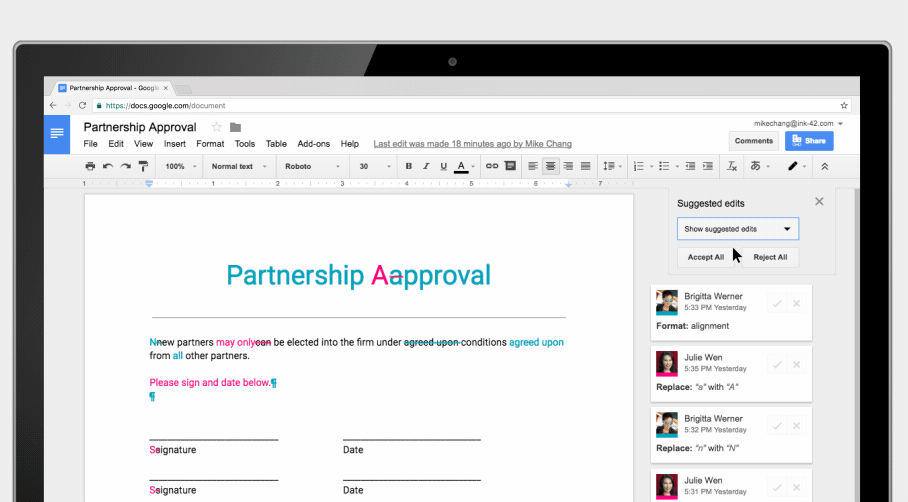
The version control feature is paired with expanded mobile support that lets users suggest tweaks from their iOS and Android devices. On the reviewer’s side, it’s now possible to bring up a clean version of a document that hides contributor notes for easy viewing. A manager can then reject or accept all the proposed updates with a single click thanks to a new bulk approval option.
G Suite’s templating feature also received an equally significant enhancement: the ability to create pre-prepared documents with third party extensions baked in. This option can come handy in quite a few situations.
The outline of, say, a non-disclosure agreement could be bundled with DocuSign Inc.’s G Suite extension to let users send contracts for signing directly through the native interface. A presentation template may incorporate a graph powered by Lucidchart Inc.’s diagram design service. There’s also support for PandaDoc, the EasyBib bibliography generator and several other popular tools.
Google said it hopes that this feature will help reduce the amount of time that users spend switching between tabs. In the same spirit, the company has added closer integration between G Suite and its Cloud Search service for finding internal documents. The tool is now accessible through the Explore tab in Docs and Slides, which can be easily toggled via a tooltip on bottom right corner.
The new features are generally available for G Suite users.
Support our mission to keep content open and free by engaging with theCUBE community. Join theCUBE’s Alumni Trust Network, where technology leaders connect, share intelligence and create opportunities.
Founded by tech visionaries John Furrier and Dave Vellante, SiliconANGLE Media has built a dynamic ecosystem of industry-leading digital media brands that reach 15+ million elite tech professionals. Our new proprietary theCUBE AI Video Cloud is breaking ground in audience interaction, leveraging theCUBEai.com neural network to help technology companies make data-driven decisions and stay at the forefront of industry conversations.