 APPS
APPS
APPS
APPS












APPS

Slack Technologies Inc. today augmented its team chat service with new search features to help workers find important files and information faster.
The approximately 8 million daily users who rely on Slack do a big portion of their communications in the service. Messages consequently tend to pile up, particularly in rooms with a lot of channels. That can make it tricky for workers to track down a specific document or note.
Today’s upgrade is meant to make the process a lot faster. When a user starts typing something into the Slack search bar, the service will now suggest relevant items in a dropdown list that borrows a page from Google LLC’s autocomplete feature (below). Slack said the results are personalized for each user based on factors such as which colleagues they interact with most often and what channels they participate in.
If the drop-down list doesn’t show what they’re after, workers can hit the Enter key to bring up the full results. Slack now displays retrieved items in an expanded search view that also introduces a new selection of filters. These make it possible narrow down results based on sender, file type, channel and other factors.
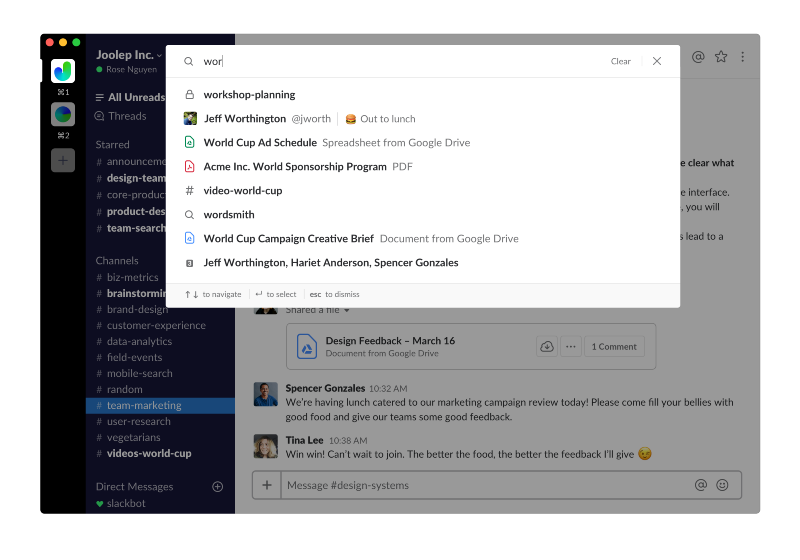
Like the search results, the filters that show up for each user are customized based on their activity habits. Workers can also create their own in case the default lineup doesn’t cut it. The custom filter provides more granular options such as the ability to limit research results to messages sent on a specific day or week.
The blog post in which Slack announced the upgrade hinted that there may some new machine learning technology behind the scenes. “As you and your teams continue to use Slack to collaborate and share information, you’ll find that your search results get smarter and smarter, pulling in channels, messages, and files that matter most to you,” the company detailed.
The revamped search should be a particularly big boon for users who work at large organizations. An employee at a business unit comprised of multiple teams, for example, might have to sift through dozens of channels’ worth of messages to find a certain file or message. Slack has been adding more advanced features in a bid to better accommodate large enterprise customers.
Support our mission to keep content open and free by engaging with theCUBE community. Join theCUBE’s Alumni Trust Network, where technology leaders connect, share intelligence and create opportunities.
Founded by tech visionaries John Furrier and Dave Vellante, SiliconANGLE Media has built a dynamic ecosystem of industry-leading digital media brands that reach 15+ million elite tech professionals. Our new proprietary theCUBE AI Video Cloud is breaking ground in audience interaction, leveraging theCUBEai.com neural network to help technology companies make data-driven decisions and stay at the forefront of industry conversations.