 AI
AI
AI
AI










AI

Google LLC today rolled out a major revamp of AI Mode in Google Chrome, giving users a more efficient way to explore the web through its conversational search experience.
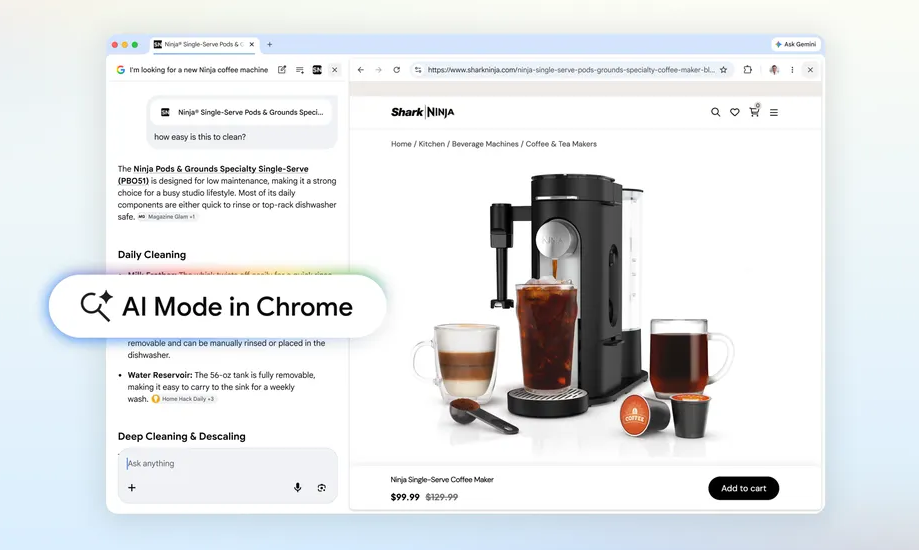
The most impactful update is that clicking links in AI Mode will see the resulting webpage open up alongside the artificial intelligence interface. This means that users can retain the context of their original search, review different websites it cites, make comparisons and ask follow up questions.
For instance, if someone is looking to buy a new coffee maker and wants some very specific features, they can tell AI Mode exactly what they’re looking for and it will pull up a list of suitable products. If the user clicks on one of the options, they’ll be able to browse that website with the AI Mode tab right there alongside it. They can then ask more pointed questions, such as “how easy is this to clean?” and AI Mode will scan both the open page and the wider web to generate an informed answer.
In a blog post, Google vice presidents of product Robby Stein and Mike Torres said early testers loved the fact that they “didn’t have to constantly switch tabs to get help with a comprehensive article or long video.” In addition, they found that “having both Search and the web side-by-side helped them stay focused on their tasks while exploring useful web pages.”
As an expansion of this feature, Google is also making it possible to use AI Mode to search across open tabs in Chrome. If a user taps the new “plus” menu in the search box in AI Mode or on a new tab, they can then select which open tabs they’d like to include in a new search. Users can also upload files such as images and PDFs, bringing additional context into their searches.
In an example, Stein and Torres said someone might be researching local hiking trails, and in doing so they may already have a few tabs open of top destinations they’re interested in. They can then use the “plus” menu to ask AI Mode to find similar trails in a different location, and it will know exactly what they’re looking for. As an alternative, if someone is studying for a statistics exam, they might want to bring the context from open tabs or their class notes into a search and ask Google to dig up more examples that illustrate a specific concept.
Today’s updates follow an aggressive push by Google to bring AI functionality into flagship products such as Search and Chrome. The company introduced AI Mode in Chrome last September, effectively transforming it into an “AI-native” browser.
That built on the original AI Overviews feature in Google Search, which faced a lot of criticism early on because of the inconsistency of its answers. However, Google has worked hard to boost the accuracy of its AI responses, and the addition of tabbed context should help it to refine the outputs it generates.
The updates to AI Mode are launching in the U.S. first of all, and will be made available in other regions soon.
Support our mission to keep content open and free by engaging with theCUBE community. Join theCUBE’s Alumni Trust Network, where technology leaders connect, share intelligence and create opportunities.
Founded by tech visionaries John Furrier and Dave Vellante, SiliconANGLE Media has built a dynamic ecosystem of industry-leading digital media brands that reach 15+ million elite tech professionals. Our new proprietary theCUBE AI Video Cloud is breaking ground in audience interaction, leveraging theCUBEai.com neural network to help technology companies make data-driven decisions and stay at the forefront of industry conversations.