 AI
AI
AI
AI


AI

Google LLC is revamping the Google Workspace suite of applications for getting things done, adding new conversational capabilities for brainstorming, an expanded AI Inbox in Gmail, and an all-new application called Google Pics that helps everyone to get the most out of their creative spark.
The swath of new features were unveiled today at Google’s annual I/O conference for developers, with the most substantial upgrades landing at the feet of Google AI subscribers and Google Workspace business customers.
The headline offering in today’s updates are the conversational features in Workspace, which are designed to let user’s voices do the work for them. The new capabilities are coming to Gmail, Docs and Keep, and they’re all about making it easier for people to brainstorm ideas and organize their thoughts, said Google Vice President of Product Yulie Kwon Kim.
Gmail is getting a new feature called Gmail Live, which is all about helping people to sort through their inboxes on the go. As Kim explained, when someone is too busy to go digging through their inbox, they can simply hit the Gmail Live button and ask it where their flight gate number is, or what’s happening at their kid’s school this week, and Gmail will search through their emails for the answers.
Another new voice capability comes to Docs. It’s called Docs Live, but the way it functions is quite different. It’s not meant to be an assistant for someone on the go, but rather designed to act as a kind of thought partner for brainstorming. For instance, a writer could talk to Docs to get it to help craft a first draft of a speech that needs writing, or an important email that needs to be sent to a client. Users can organize their thoughts, structure the document, and – if they give Docs permission – instruct it to rummage around through Gmail, Drive or Chat and find relevant details.

Meanwhile, Keep’s new conversational functionality is all about capturing those fleeting ideas that suddenly pop into our heads. It’s like a conversational sticky note for users to just “brain dump,” Kim explained. Powered by Gemini 3.5 Flash, Keep will not only decipher someone’s ramblings, but also take action, transforming them into an organized note or list.
Kim said the new capabilities will be made available to Google AI Pro and Ultra subscribers first, with business customers using Google Workspace set to gain access by the summer.
Google made a lot of fanfare about Google Pics, which is a brand-new image creation and editing tool that’s built on the most powerful Nano Banana model available. It’s designed for precision editing, and aims to overcome the annoying fact that, while AI image generators can be prompted to create an image that’s similar to what someone had in mind, it never gets it quite right. It’s rolling out to “trusted testers” first, before coming to Google AI Pro and Ultra subscribers globally this summer, and Workspace users in preview at around the same time.
Kim said Google Pics takes the hassle out of complex image generation, and can be used for everything from social media content to tweaking digital illustrations. Its core features including object segmentation, which allows users to select and edit specific elements within an image. It’s possible to move objects around, alter their dimensions and color, or resize it entirely, without messing up the rest of the image. There’s also a text editing and translation tool feature in the app that makes it simple to modify or translate any text that appears within a photo. The app is tightly integrated with Workspace, so users can access their images via Drive and Slides too.
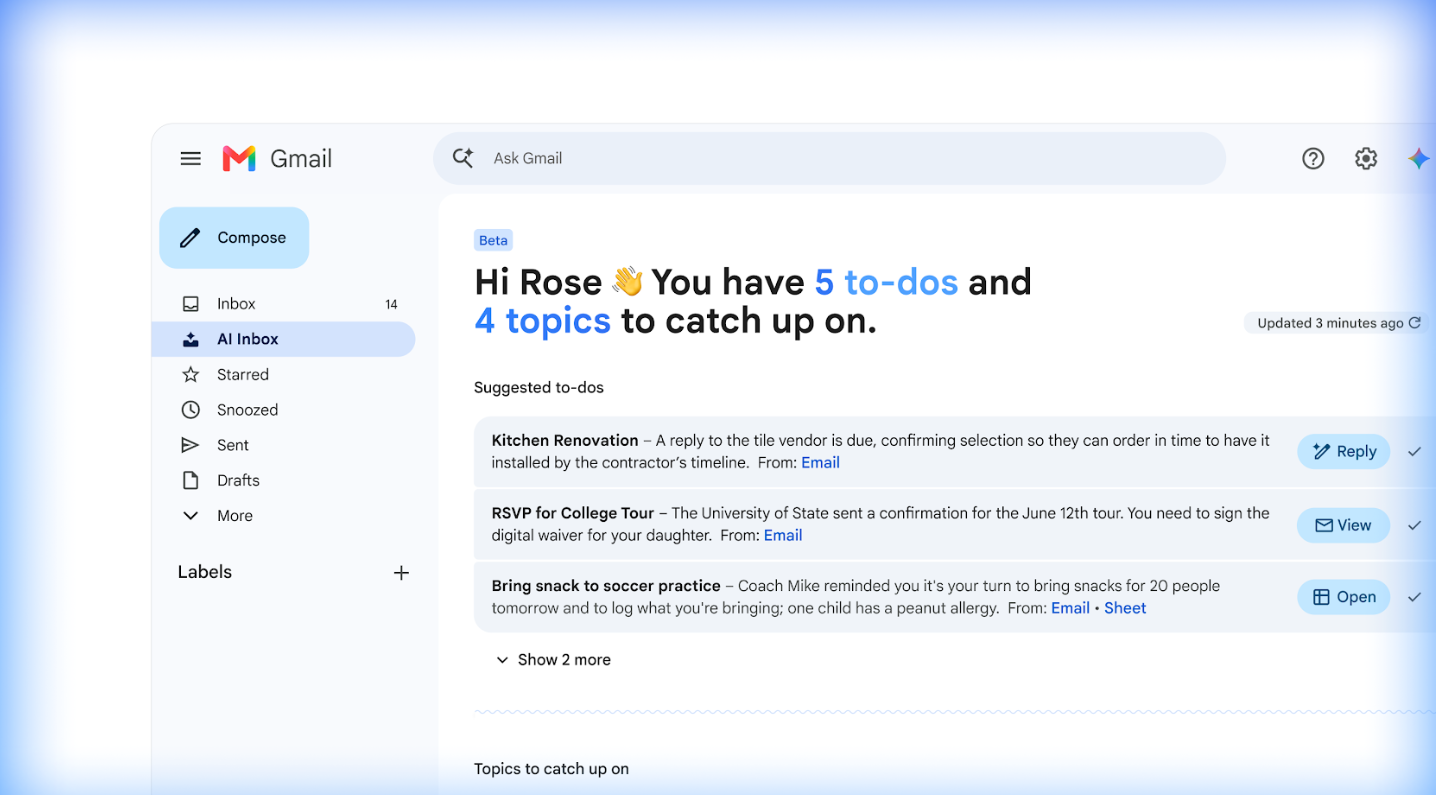
As for Gmail’s AI Inbox, it’s getting even more intelligent, Kim said. New functionality includes personalized draft replies, wherein the AI will generate a contextual draft for a quick reply that users can review and send in seconds. It’s also getting “instant file access,” which means users will be able to access their files without digging around through their emails whenever a relevant task requires them to look at a Google Doc, Sheet or Slide. And to help keep inboxes free of clutter, the company is also introducing “streamlined task management,” so users can quickly mark individual tasks as “done,” dismiss unhelpful suggestions and mark all emails on a specific topic as “read” in a single click.
AI Inbox is available now to Google AI Ultra customers and in preview for Workspace Enterprise Plus users, and will also come to Google AI Plus and Pro customers in the coming weeks, Kim said.
Finally, Google unveiled a new 24/7 personal agent called Gemini Spark, which is designed to help users navigate their digital lives more easily. “Spark represents a big shift for Gemini, transforming it from an assistant that can answer questions to one that takes action on your behalf, under your direction,” Kim said.

Users will have to turn Gemini Spark on themselves, and when they do, they’ll find that it will always ask them before performing actions such as sending emails on their behalf and adding events to their calendar. It’s coming to Workspace customers first via the Gemini app in the coming weeks.
Support our mission to keep content open and free by engaging with theCUBE community. Join theCUBE’s Alumni Trust Network, where technology leaders connect, share intelligence and create opportunities.
Founded by tech visionaries John Furrier and Dave Vellante, SiliconANGLE Media has built a dynamic ecosystem of industry-leading digital media brands that reach 15+ million elite tech professionals. Our new proprietary theCUBE AI Video Cloud is breaking ground in audience interaction, leveraging theCUBEai.com neural network to help technology companies make data-driven decisions and stay at the forefront of industry conversations.